Featured post

General Ledger Revaluation

General Ledger Revaluation Account balances denominated in foreign currencies are adjusted through the revaluation procedure. Revaluat...

Tuesday, 20 August 2019

27 Questions Answered on EBS Financials vs ERP Cloud! ORACLE CLOUD By Fanni Stalzer June 14, 2016

“EBS Financials vs ERP Cloud: Key Functional Differences”, which focused on the functional differences between the two ERP suites. 

What is your assessment of other modules such as Supply Chain, Procurement and Manufacturing?
Procurement is phenomenal. Supply Chain is pretty good, what I’ve seen in manufacturing seems very good, but I’d be hesitant to be in the first release – if you’re going to do that, you need to be sure you have the right business case. A year from now we will see a lot of customers adopting the Manufacturing piece.

What is the biggest benefit for customers adopting the Cloud?
The first one is functionality, there’s also the part of skipping the hardware investment and hardware maintenance resources, and there’s also the part of being in the cutting edge of technology, always receiving the latest functionality and enhancements. We speak to many customers who have not updated their Oracle since 2003, and think of how different your business was at that point – this is one of the best advantages of the Cloud.

Looking at the roadmap, what item should we most be looking forward to?
Look out for the Cloud equivalent of iReceivables – the functionality it will carry is by far the most exciting one.

Are Financials easier to implement in the Cloud or in EBS?
Oracle has gone out of its way to make implementation easier in the Cloud - think rapid implementation sheets. Last week we were at a customer kicking off a Cloud project, and we got 70% of the modules implemented in 2 days, just working through the spreadsheet uploaders. It’s very easy to go and do that, and in the latest release Oracle has even simplified what they had simplified before.

The Financial Reports Center reports shown in the presentation are out of the box or customized?
Oracle provides about 180 standard financial reports – all subledger type reports. The Financial Reports Center reports need to be built as part of the project as every customer has its own Chart of Accounts structure. Typically you work with your implementation partner to build those, it is a custom piece of the implementation.

Is AP Invoice scanning included or an additional product? Is Advanced Collections a separate module?
Those are both separate modules. Advanced Collections is separately licensed, about $150 per month, with a 5 user minimum. AP Invoice imaging list price is $3,000 per 1,000 invoices. Very cheap versus the on premise investment.

Is iSupplier still in Cloud ERP or is it part of Payables?
There is, it’s called the Supplier Portal now, it’s easier to use and better looking. We will cover it soon when we do our webinar on Procurement.

Is the Excel option in a browser or workstation? Do we need a MS Office license?
Yes, you need a license for Microsoft Office. Bear in mind that SmartView does not run in Macs, you will need a virtualized Windows machine.

Does Oracle iExpense Cloud only work with American Express?
No, you can build the integration for other credit cards – Diners, Visa, whatever you need.

Is there a web API for AR invoices?
Yes, for AR and AP both.

What is lacking in the multi-period accounting functionality when comparing EBS and ERP Cloud?
Let’s say you have an expense that comes across for $1,200 and you want to recognize that in a 12-period (in the first $100, $1100 deferred) you can set that up automatically in EBS. This capability is not there yet in ERP Cloud. You can still do it with a workaround; it’s just not such a straight forward process.

How easy would it be to keep a hybrid model?
Well, you can have HCM or Sales on the Cloud, but splitting your ERP between Cloud and EBS modules adds a lot of complexity, so the ROI would not really make sense. It’s a hard sell when looking at the costs of implementing and supporting such a model.

What are the differences between the Purchasing and iProcurement modules?
The functionalities are very similar; we will cover them soon when we do our webinar on Procurement.

How do clients typically manage migrating customizations to the Cloud?
Because there are no customizations to the Cloud, you have to make decisions – the ultimate one being: “Is this customization important enough to us to be developed outside?” If you need to keep a customization you will need to use the Platform as a Service and create an external app that integrates it. What we’ve seen is that from 20 customizations, 16 are covered by standard functionality. There’s usually only one that customers need to really decide on, and then it’s a matter of ROI. In financials, what can you really be doing that is different at the end of the day? Pay, bill, revenue, reports... is it really driving the business value? It’s all about the analysis.

Is Mobile expenses app available in EBS from what version? 
It’s Oracle R12.1.3 and afterwards. You can start using them now, the fusion apps modules are free.

Can you tell me more about invoice imaging in Payables? 
If it’s a PDF someone sends you, you see about 90% accuracy; for a physically scanned invoice it’s somewhat around 80 to 85% accuracy. You set it up and you can configure how it is routed. Your user comes in, sees the invoice, clicks on it, it pops up and they validate. If it’s a PO, you can even run the matching program against it. Then it automatically attaches that to the invoice, so from a cost and ROI perspective, it’s the best ROI from all the financial modules.

How long would a full migration from EBS to ERP Cloud take? 
It really depends. For quick books we’re doing an 8 week project. Others range from 12 to 16 weeks. The timeline is so much shorter (especially if you do not have a lot of countries) because you are not dealing with customizations. The implementation itself takes barely 8 weeks, but the integration and data conversion add the extra weeks.

In your experience, are customers going for the full Cloud migration or coexistence model? 
Most customers go all the way in.

Can you tell me more about Fusion Revenue Management addressing IFRS revenue recognition? 
Fusion Revenue Management is a module that supports multiple element arrangements, VSOE, etc. Oracle has been tweaking it for the past two years, and it’s waiting for the rules to be finalized and make sure it works properly, but it allows your sales team to sell bundle products and apply the true revenue recognition behind there. They are targeting December 2017 but it has not been finalized yet.

Are you able to modify the logic for workflow approvals? 
Yes, there’s a UI to modify the existing workflows and create those you want. I have not seen that being an issue for any customers, but you can do that.

For the data migration, how the initial master data move is done? Does Oracle have integration points out of the box? 
Yes, there’s the Oracle Enterprise Repository, which lists all of the integrations, a combination of file uploads, web services, all of the pieces.

How successful are integrations with asset management systems? Does it have a similar cost accounting model for long term capital projects as in Oracle EBS? 
Yes, in PA there are a lot of similarities for handling capital projects and being able to capitalize from there.

How does Cloud support customizations like Personalization, 3rd party interfaces, etc.?
Personalization and branding are outstanding in the Cloud. Each user can personalize their user experience. For third party interfaces Oracle provides the Enterprise Repository with all of the various details for interfacing to and from the Cloud application.

Can we have Financials on Cloud an Manufacturing on-premise EBS?
You can leverage FAHRCS to provide this type of model by giving you Cloud reporting.

Are Request Sets available in ERP Cloud?
There is not direct request set functionality, but any user can schedule any batch process.

Oracle comes with various integration API out of the box. Can I develop my own API?
No, the data model cannot be changed, but if you have the need to have an API that is not available you can work with Oracle development. We worked with a customer who needed a Webservice for contract integration. Oracle got the Webservice into the next release for them.

Oracle Apps Finance : ORACLE UNIFIED METHOD (OUM) OVERVIEW AND DOCUMENTS...

Oracle Apps Finance : ORACLE UNIFIED METHOD (OUM) OVERVIEW AND DOCUMENTS...: ORACLE UNIFIED METHOD (OUM) INTRODUCTION Oracle is evolving the Oracle ® Unified Method (OUM) to realize the vision of supporting th...

Sunday, 4 August 2019

Oracle Property Manager – Introduction – Overview

Introduction

The Property Management Module is designed as a property database for organisations with large property  management portfolios. This paper is to provide an overview of the module describing its features and functionality. Using this structured database users can manage space allocations within their portfolio for both employees and/or customers. Customers’ space can be charged via an interface to the Accounts Receivable package or invoices for rent can be generated and interfaced to the Accounts Payable Module.
The database will hold various types of data including, features, contacts, tenancies, lease and other documentation such as insurances, rights, obligations and milestones. The module also has the standard flexfield functionality as in other Oracle Modules for the capture of user-defined data.

Property Definition

The database of properties has an inbuilt hierarchy starting at the top by grouping properties within regions and office parks. A property is then defined as a combination of land detail and building detail. Land can be subdivided into parcels. Land details include area, conditions and features that can be recorded against each land or parcel record. The use of flexfields would allow for the recording of asset numbers, title details, etc. Building details can include address, tenure, user defined class and status. Additional details include rentable, useable and assignable area, occupancy area, features and contacts. Buildings can be further subdivided into floors, and again into offices with the same level of detail being recorded against each individual record at each level.

Assignments

Properties can be assigned to either employees or customers at any of the levels described above. With each of these assignments cost centres or GL codes can be associated for revenue or costing purposes. The facility to record Project/Task/Organisation data has also been provided. The system provides statistical information on the assignments and total occupancy at the building, floor and office levels. Query screens are provided to enquire on the assignment data at each of the levels.

Leases and Documents

Lease details and various classifications of documents can be associated with each building floor or office. The details of these documents can be recorded and may form the basis for either billing customers through Accounts Receivable or the payment of rent through Accounts Payable. Recurring invoices for either accounts Receivable or Accounts Payable can be constructed within this module and after approval, interfaced directly to the other modules. This approval can be into the future.
Detail in these screens is extensive with tabs for Detail, Contacts, Locations, Insurances, Rights, Obligations, Options, Billings and Notes. There is a facility to record milestones which will generate notifications to responsible officers so they can be notified of specific occurrences with lead times set by the user. Using the details from Lease Documents the system will generate individual entries for export to Accounts Payable and Accounts Receivable. Each entry is created as a draft and must be approved prior to export. Details of these entries are maintained in Property Manager.

Agents

The system also maintains a list of agents or contacts related to each property. These contacts can be used throughout the module. They are divided into Customers, Suppliers and Employees. Using the standard integration of Oracle Applications these contacts are maintained in their respective modules. A contact role is available for allocation throughout the Property Module.

Reports

Standard reports with the system are divided into Space, Rent, Employee, Lease and other reports. The system has some 30 standard reports including 7 RXi reports. Specific reports based on client needs will require the use of Discoverer or other reporting tool. The module also has facilities to import and export data to CAD models for space allocations and locations.

In General

The Property Management Module can be interfaced to both the Accounts Payable and Accounts Receivable modules and if required, using flexfields, linked with the Fixed Asset module. The module is not used for maintenance cost recording however, property numbers could be referenced in Accounts Payable using flexfields for the creation of a property cost reporting mechanism. Our client uses the system as a Property Register, which records all possible information about a property. Security suppliers, cleaning suppliers, landlords, insurances, renewal dates, etc can all be recorded and found quickly. The major benefit from the system is the billing of rent to customers. Our client is a Water and Power utility that rents space for communications towers on various infrastructure assets. Tracking all the rent invoices on a monthly basis was completed using spreadsheet. The Property Management Module allows for the tracking of what has or has not been billed and in conjunction with the Accounts Receivable module what has or has not been paid.

Conceptually : Record to Reporting Cycle – R2R

Conceptually : Record to Reporting Cycle – R2R

This process involves collecting, transforming and delivering relevant, timely and accurate information to all stakeholders inside and outside the organization, to provide insight into how their expectations have been met.
It covers the steps involved in preparing and reporting the overall accounts which are typically stored in a general or nominal ledger and managed by a comptroller. The detailed steps involved are:
  • data extraction
  • data collection
  • data validation
  • data transformation (generation of voucher)
  • voucher posting (to general ledger)
  • storing vouchers in de-normalized and compressed format
  • generating analysis account trial balance or consolidated analysis account trial balance
  • generating user-defined financial and management reports
In ERP systems , This is part  month end  process in which basically user will close all the periods  and import all the journals in GL from other modules
(Payable, Receivable, Fixed Assets etc.). Then run all the month end GL reports like Trial Balance, Account Analysis  etc.
Following are broader division of activity involved in Record to Report Cycle
Reconciliations
  • Intercompany
  • Multiple systems
  • Bank
  • Subsidiary to main set of books
  • Customer
  • Vendor
General Accounting
  • Journal Entries
  • Intercompany accounting
  • Book closures
  • Trial Balance preparation
  • Accruals
  • Consolidations
  • Cost Accounting
Record to Report process might seem simple but it require considerable efforts. It is the only process scrutinized by outside auditors who draw conclusions about controls in place during financial close and reporting cycle.

Saturday, 3 August 2019

ORACLE WORK IN PROCESS SETUP DOCUMENT IN R12.2

Table of Contents


STEP 1: Setup Prerequisites
Before you set up Work in Process, you must complete the setup for the following: products

ORACLE INVENTORY

Make sure you set up Inventory as described in Overview of Setting Up Inventory. Ensure that all the following steps have been completed:
http://docs.oracle.com/cd/A60725_05/html/comnls/us/wip/t_chkbox.gif   Create your organizations
http://docs.oracle.com/cd/A60725_05/html/comnls/us/wip/t_chkbox.gif   Define your organization parameters
http://docs.oracle.com/cd/A60725_05/html/comnls/us/wip/t_chkbox.gif   Define your items and item costs
http://docs.oracle.com/cd/A60725_05/html/comnls/us/wip/t_chkbox.gif   Launch your transaction managers
http://docs.oracle.com/cd/A60725_05/html/comnls/us/wip/t_chkbox.gif   Define your account aliases (Optional)
http://docs.oracle.com/cd/A60725_05/html/comnls/us/wip/t_chkbox.gif   Define your transaction reason codes (Optional)
http://docs.oracle.com/cd/A60725_05/html/comnls/us/wip/t_chkbox.gif   Define your units of measure (UOMs)
http://docs.oracle.com/cd/A60725_05/html/comnls/us/wip/t_chkbox.gif   Define your transaction types (Optional)
http://docs.oracle.com/cd/A60725_05/html/comnls/us/wip/t_chkbox.gif   Define your subinventories
http://docs.oracle.com/cd/A60725_05/html/comnls/us/wip/t_chkbox.gif   Define your stock locators

ORACLE BILLS OF MATERIAL

Make sure you set up Bills of Material as described in Overview of Setting Up Bills of Material. In addition to the set up, ensure that all the following steps have been completed:
http://docs.oracle.com/cd/A60725_05/html/comnls/us/wip/t_chkbox.gif   Create your bills of material
http://docs.oracle.com/cd/A60725_05/html/comnls/us/wip/t_chkbox.gif   Define your resources
http://docs.oracle.com/cd/A60725_05/html/comnls/us/wip/t_chkbox.gif   Define your departments
http://docs.oracle.com/cd/A60725_05/html/comnls/us/wip/t_chkbox.gif   Define your standard operations
http://docs.oracle.com/cd/A60725_05/html/comnls/us/wip/t_chkbox.gif   Create your routings (Optional)
http://docs.oracle.com/cd/A60725_05/html/comnls/us/wip/t_chkbox.gif   Calculate your manufacturing lead times (Optional)
http://docs.oracle.com/cd/A60725_05/html/comnls/us/wip/t_chkbox.gif   Create your workday calendar

ORACLE ENGINEERING

Make sure you set up Engineering as described in Overview of Setting Up Engineering.
http://docs.oracle.com/cd/A60725_05/html/comnls/us/wip/t_chkbox.gif   Define your engineering change orders(Optional)
http://docs.oracle.com/cd/A60725_05/html/comnls/us/wip/t_chkbox.gif   Define your engineering bills of material and routings(Optional)

ORACLE COST MANAGEMENT

Make sure you set up Cost Management as described in Overview of Setting Up Cost Management.
http://docs.oracle.com/cd/A60725_05/html/comnls/us/wip/t_chkbox.gif   Define your cost types
http://docs.oracle.com/cd/A60725_05/html/comnls/us/wip/t_chkbox.gif   Define your resource activities and activity costs
http://docs.oracle.com/cd/A60725_05/html/comnls/us/wip/t_chkbox.gif   Define your default WIP accounting classes for categories (Optional)

ORACLE PROJECT MANUFACTURING

Make sure you set up Project Manufacturing

ORACLE MRP/MASTER SCHEDULING AND SUPPLY CHAIN PLANNING

Make sure you set up MRP/Master Scheduling and Supply Chain Planning as described in Overview of Setting Up MRP/Master Scheduling and Oracle Supply Chain Planning Overview of Setting Up MRP/Master Scheduling and Oracle Supply Chain Planning, Oracle MRP/Master Scheduling and Oracle Supply Chain Planning User's Guide.
http://docs.oracle.com/cd/A60725_05/html/comnls/us/wip/t_chkbox.gif   Define your demand classes (Optional)


STEP 2: Profile Options in Work In Process

Key
http://docs.oracle.com/cd/A60725_05/html/comnls/us/wip/t_chkmrk.gif
You can update the profile option.
D, R, P
The profile is applicable to discrete, repetitive, and project manufacturing.
WO
The profile is applicable to flow manufacturing (work order-less) manufacturing.

Profile Option
User
System Administrator
Requirements

User
User
Resp
App
Site
Required?
Default Value
Applies To
http://docs.oracle.com/cd/A60725_05/html/comnls/us/wip/t_chkmrk.gif
Required
On-line processing
All
http://docs.oracle.com/cd/A60725_05/html/comnls/us/wip/t_chkmrk.gif
Required
On-line processing
D, R, P
http://docs.oracle.com/cd/A60725_05/html/comnls/us/wip/t_chkmrk.gif
Required
On-line processing
D, R, P
http://docs.oracle.com/cd/A60725_05/html/comnls/us/wip/t_chkmrk.gif
Required
Job
D, R, P
http://docs.oracle.com/cd/A60725_05/html/comnls/us/wip/t_chkmrk.gif
Required
Message level 0
D, R, P
http://docs.oracle.com/cd/A60725_05/html/comnls/us/wip/t_chkmrk.gif
Required
On-line processing
D, R, P
http://docs.oracle.com/cd/A60725_05/html/comnls/us/wip/t_chkmrk.gif
Required
Job
D, R, P
http://docs.oracle.com/cd/A60725_05/html/comnls/us/wip/t_chkmrk.gif
Required
On-line processing
D, R, P
http://docs.oracle.com/cd/A60725_05/html/comnls/us/wip/t_chkmrk.gif
Required
Job
D, R, P
http://docs.oracle.com/cd/A60725_05/html/comnls/us/wip/t_chkmrk.gif
Required
None
D, R, P
http://docs.oracle.com/cd/A60725_05/html/comnls/us/wip/t_chkmrk.gif
Required
On-line processing
D, R, P
http://docs.oracle.com/cd/A60725_05/html/comnls/us/wip/t_chkmrk.gif
Required
Job
All
http://docs.oracle.com/cd/A60725_05/html/comnls/us/wip/t_chkmrk.gif
Required
On-line processing
All
http://docs.oracle.com/cd/A60725_05/html/comnls/us/wip/t_chkmrk.gif
Required
Unscheduled
WO
http://docs.oracle.com/cd/A60725_05/html/comnls/us/wip/t_chkmrk.gif
Required
No
D, P
http://docs.oracle.com/cd/A60725_05/html/comnls/us/wip/t_chkmrk.gif
Required
Interactive definition
D, P
http://docs.oracle.com/cd/A60725_05/html/comnls/us/wip/t_chkmrk.gif
Required
None
D, P, WO
http://docs.oracle.com/cd/A60725_05/html/comnls/us/wip/t_chkmrk.gif
Required
Yes
D, R, P, WO

http://docs.oracle.com/cd/A60725_05/html/comnls/us/wip/t_chkmrk.gif
Required
Yes
D, P
http://docs.oracle.com/cd/A60725_05/html/comnls/us/wip/t_chkmrk.gif
Required
No
D, R, P
http://docs.oracle.com/cd/A60725_05/html/comnls/us/wip/t_chkmrk.gif
Required
View all subinventories
D, R, P, WO
http://docs.oracle.com/cd/A60725_05/html/comnls/us/wip/t_chkmrk.gif
Required
Yes
D, R, P, WO


STEP 3: Define WIP Parameters
Try to open the Discrete Jobs form to create the Standard Discrete Jobs
Responsibility: Work In Process Navigation: Discrete > Discrete Jobs
Select the Organization as "DYN" (Newly created manufacturing organization)
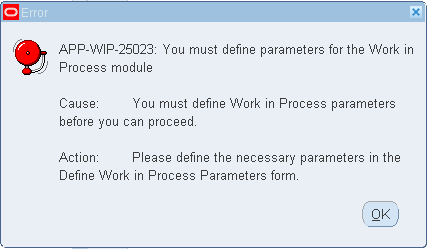
Will get the below error message while opening the Discrete Jobs form
To rectify this error, first we should define the WIP Parameters.

WIP Parameters:
WIP Parameter form have multiple TAB regions
  1. Discrete
  2. Repetitive
  3. Costing
  4. Move Transaction
  5. Material
  6. Intraoperation
  7. Outside Processing
  8. Scheduling
  9. Mobile
  10. Serial
  11. Other
We must define modes of operation that affect other functions in Oracle Work in Process and assign default values before we can perform any transactions in our organization. We must also enable the intra-operation steps we want to use in our routings to allow detailed tracking within operations on the shop floor. Oracle Work in Process always enables queue for each operation and To Move for the final operation in a routing.
Responsibility: Work In Process Navigation: Setup > Parameters

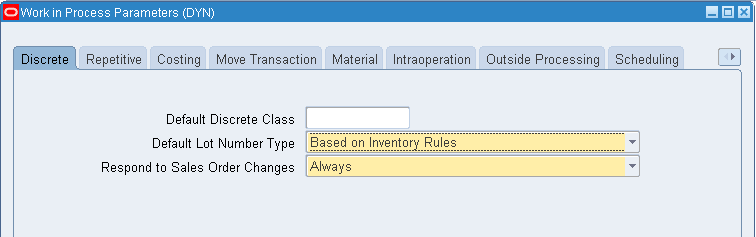
DISCRETE:


  • Default Discrete Class: Determines the default Account codes for Discrete job transactions.
  • Default Lot Number Type: Determines how lot numbers are assigned to discrete jobs.
Available Lot Number Types
  1. Job Name  - Lot Numbers are based on the Discrete Jobs Name
  2. Based on Inventory Rules - Based on the Inventory Rules which we have defined in Inventory
  3. No Default - No Defaults
  • Respond to Sales Order Changes: Determines if and how the system responds to changes to assemble-to-order (ATO) sales orders and their related discrete jobs. Determines the status of a work order reserved and linked to a sales order: if a configured item is de-linked from a sales order or sales order line placed on hold.
Available Values
  1. Never: The work order will not be placed on hold if you de-link the configured item from the sales order, or if the sales order is placed on hold.
  2. Always: The work order will be placed on hold if you de-link the configured item from the sales order, or if the sales order is placed on hold.
  3. When Linked 1 to 1: The work order will be placed on hold if it is the only work order reserved to that sales order.
Important: When cancelling sales order lines with ATO items, this parameter, is ignored by the system.


REPETITIVE:


  • Recognize Period Variances

Determines which repetitive schedule variances are posted to the general ledger when an accounting period is closed. The options are as follows:

All Schedules
Post variances for all repetitive schedules.
Cancelled and Complete- No Charges Only
Post variances for repetitive schedules with statuses of Cancelled or Complete-No Charges.
  • Autorelease Days

Determines the time period within which the system automatically releases the next Unreleased schedule.
When you complete a repetitive schedule, the system searches within the autorelease time frame for an Unreleased schedule, or for a schedule with a status of Released, Complete, or On Hold. If one exists, the status of the newly completed schedule changes to Complete-No Charges and the future schedule is automatically released. If no such schedule exists, the status of the schedule changes to Complete. If more than one schedule exists within the autorelease time frame, only one schedule is released.


COSTING:


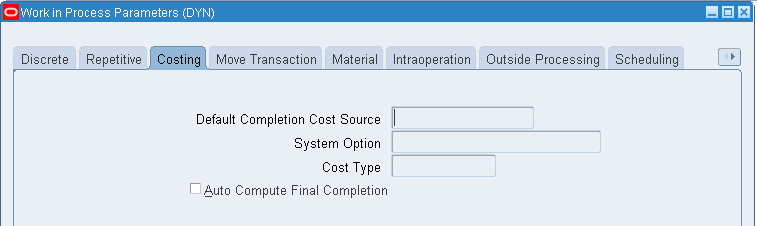
For Standard Costing Organizations, this Costing TAB will be greyed out.
These parameters are for Average Costing organizations.
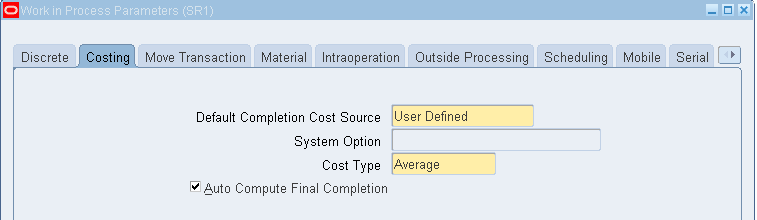
  • Default Completion Cost Source

Two Cost Sources:
  • System Calculated
  • User Defined
This parameter determines how resource costs are determined as assemblies are completed from jobs into inventory.
If this option is set, resources can be costed at either the actual resource costs or at the resource predefined cost depending on how the System Option parameter is subsequently set.
When completing assemblies from a non-standard job with no routing, the resource rate associated with the Average Rates cost type is used.
If the option is set, you must choose a user-defined cost type using the Cost Type Parameter. This cost type is then used to determine the resource cost for the assemblies being completed.
  • Additional Information: If there are uncleared costs left in the job, they are posted to the job variance accounts when the job is closed. Residual costs could be left in the job if: 1) the Auto Compute Final Completion option is set, but not all assemblies are completed or scrapped or 2) the job earns costs between the last final completion and the close transaction.
  • System Option

If you select the System Calculated completion cost source, you must select a System Option.

The available options are as follows:

User Actual Resources
Resources costs are determined based on the actual costs that have been charged to the job.
Use Predefined Resources
Resources costs are determined using the predefined resource cost.
  • Cost Type

Determines which cost type to use as the default when the Default Completion Cost Source is User-Defined. You can only select a Cost Type if the Default Completion Cost Source parameter is set to User Defined. See: Defining a Cost Type.

  • Auto Compute Final Completion

Determines whether the Final Completion in the Completion Transaction window defaults to checked (Yes).

MOVE TRANSACTION:


  • Require Scrap Account: If you require to account the Scraps then enable this checkbox.
  • Allow Creation of New Operations: If this checkbox has enabled then system will allow us to create a new Operations for that particular Discrete Jobs
  • Allow Moves Over No Move Shop Floor Statuses If this checkbox has enabled then system will allow us to move the materials even though there is a restrictions in Shop Floor Statues form ("Allow Moves" check box will be unchecked in Shop Floor Statues form for a particular status. If we enable "Allow Moves Over No Move Shop Floor Statuses" this checkbox then system will override the Shop Floor Statuses settings.)

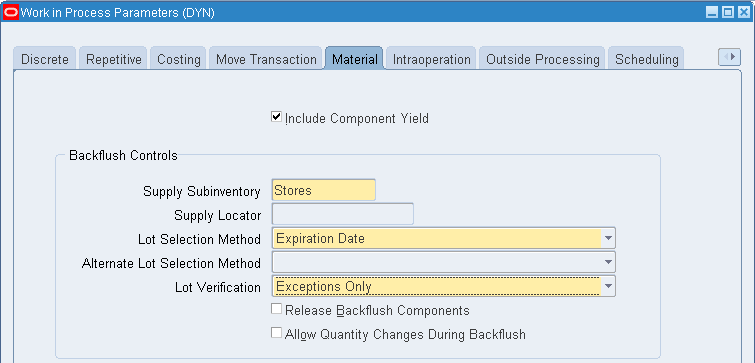
MATERIAL:


INTRA OPERATION:


Enable the check boxes for the required statuses. If you don't want to move the materials in any of the statuses then uncheck those things.


OUTSIDE PROCESSING:


  • Shop Floor Status for PO Move Resources: You can define the statuses in "Shop Floor Status" form and then you can assign that status in this field.
  • Requisition Creation Time: When you would like to create the Purchase Requisition?
  • At Operation: When we move the moterials to Outside Processing Operation then that time the Requisition Import program will be submitted and Purchase Requisition will be created
  • At Job/Schedule Release: As soon as we release the Job/Schedule, the Requisition will be created
  • Manual: Manually we need to create the Purchase Requisitions by running the "Requisition Import" Program.
  • Job Roles for Notifications: If you want to notify Production Scheduler and Shipping Manager about the Jobs then you can enter their names
  • Propagate Job Change to Purchasing: If you would like to propagate the changes that are made in Jobs to Purchase Order then enable "Automatic". Else make it as Manual and do changes in Purchase Orders manually.
  • Need-By Date Tolerance: System will allow us Plus or Minus the entered date for Need by date.

SCHEDULING, MOBILE, OTHER:

Leave the defaults in Scheduling, Mobile and Other TABs

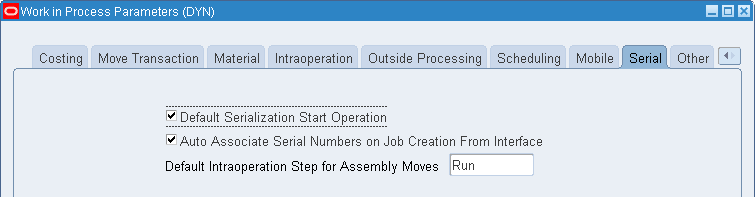
SERIAL:


STEP 4: Define WIP Accounting Classes
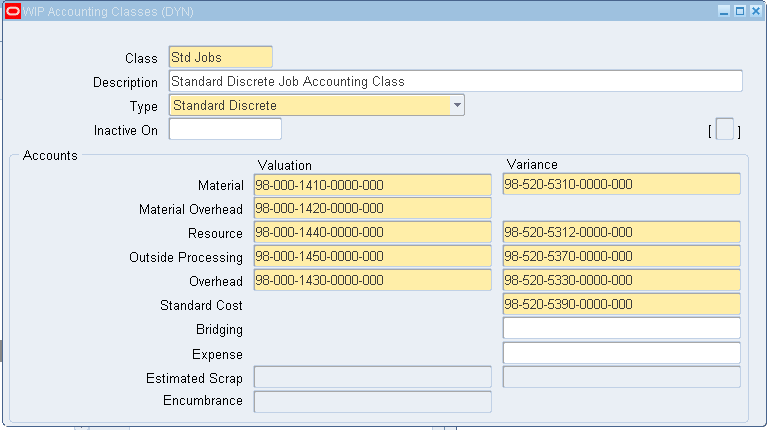
We must define separate accounting classes for Standard Discrete Jobs, Non-Standard Expense Jobs, Non-Standard Asset Jobs, and Repetitive Assemblies. Accounting classes include the elemental valuation and variance accounts you use to cost discrete and repetitive production.
Responsibility: Work In Process Navigation: Setup  > WIP Accounting Classes
Create one Accounting Class for Standard Discrete Jobs

STANDARD DISCRETE:

Class: Enter the WIP Accounting Class Code
Type: Select "Standard Discrete" for Standard Discrete Jobs
Enter the Below Accounts
  • WIP Material Account and it's Variance Account
  • WIP Material Overhead Account
  • WIP Resource Account and it's Variance Account
  • WIP Outside Processing Account and it's Variance Account
  • Standard Cost Variance Account

After defining the WIP Accounting Class for Standard Discrete Jobs, attach this Accounting Class in WIP Parameters
Responsibility: Work In Process Navigation: Setup > Parameters

EXPENSE NON-STANDARD FOR EXPENSE:

EXPENSE NON-STANDARD FOR REWORK:

Likewise you can create the WIP Accounting Classes for RMA Rework, Asset Non-Standard Jobs etc.,

STEP 5: Shop Floor Status
If you want to optionally prevent move transactions from steps within an operation, you can define shop floor statuses which prevent moves and assign them to operations and intraoperation steps within discrete jobs or repetitive schedules. You can also use these statuses to record more detailed information regarding assemblies at a particular step within an operation.

CREATE SHOP FLOOR STATUSES:

Responsibility: Work In Process
Navigation: Move Transactions > Shop Floor Statuses > Shop Floor Statuses
After creating the Shop Floor Statuses, you can assign these statuses against the Discrete Jobs Operations whenever it's required

ASSIGN SHOP FLOOR STATUSES TO DISCRETE JOBS:

Navigation: Move Transactions > Shop Floor Statuses > Assign Shop Floor Statuses
Query by Job number and assign the Shop Floor Status for a particular Operation, Department and Step.

ASSIGN SHOP FLOOR STATUSES IN WIP PARAMETERS:

Responsibility: Work In Process Navigation: Setup > Parameters

STEP 6: Define Employee Labour Rates
If you want to charge employee labor for employees that you defined, you must define the hourly labor rate of your employees. Oracle Work in Process uses employee rates when you manually charge person-type resources to jobs or repetitive schedules that do not charge at the standard rate, and when you associate an employee number with the resource you are charging.
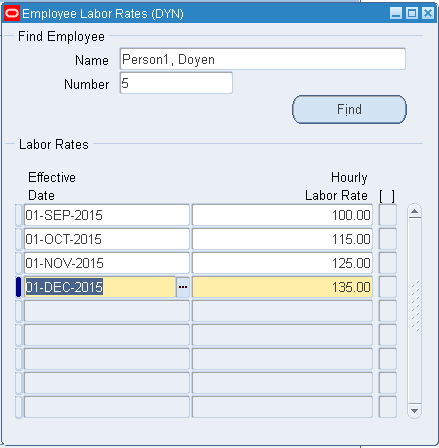
You can add, delete, and update the effective date of the hourly labor rates for person-type resources (employees). You can define multiple hourly labor rates for the same employee, as long as each rate has a different effective date. If you use actual costing, the hourly labor rate rather than the standard rate is used to compute the actual cost of person-type resources charged to discrete jobs and repetitive schedules. You can enter an employee number when performing a person-type resource transaction in the Resource Transactions window or the Resource Transaction Open Interface Process. The employee's most current hourly labor rate is used to compute the actual cost of the transaction.
Responsibility: Work In Process Navigation: Setup > Employees > Labour Rates
Query the Employee that you would to define the Labour Rate
You can define multiple rates for one employee with different dates.
STEP 7: Production Lines
You can define and update, but not delete, production lines. A production line describes a unique set of operations, departments, and/or manufacturing cells that produce one or more of your products. You can associate production lines with repetitive assemblies, discrete jobs, and work order-less completions.
Responsibility: Work In Process Navigation: Setup > Production Lines

http://docs.oracle.com/cd/A60725_05/html/comnls/us/wip/t_tskarw.gif   To define a production line:

1. Navigate to the Production Lines window.
2. Enter the production line Name.
For example, enter LINE1 to signify production line number 1, or BOARD to signify the PC board assembly line.
3. Enter the production line Description.
4. Enter the Minimum Hourly Rate.
This represents the minimum number of assemblies the line can produce per hour. The minimum hourly rate must be greater than 0 and less than or equal to the maximum rate.
Note: It's not a hourly Amount. It's a hourly output number
5. Enter the Maximum Hourly Rate.
This represents the maximum number of assemblies the line can produce per hour. The maximum hourly rate must be greater than or equal to the minimum rate.
Note: It's not a hourly Amount. It's a hourly output number
6. Enter the production line Start time.
This is the time at which your production line starts running every day. You can update this field at any time.
7. Enter the production line Stop time.
This is the time at which your production line stops running every day. You can update this field at any time.
Note: The difference between the Start and Stop times represents the amount of time per day a line is available. If the Start and Stop times are the same, the production line is considered to be available 24 hours per day.
8. Select the Lead Time Basis.
If the lead time varies by assembly, you can schedule the repetitive production time based on the routing of the assembly the line is building. You can set a fixed lead time if the lead time is determined by the production line and does not vary by assembly. You can update this field at any time.
Fixed: The system schedules the first unit completion date and the operations of all repetitive schedules on this production line based on the fixed lead time hours you enter for the production line. Scheduling is done regardless of actual capacity or the lead time of the routing of the repetitive assembly.
Routing-Based: The system schedules the first unit completion date and the operations of all repetitive schedules on this production line using the detailed shop floor scheduling algorithm, the routing of the assembly, and a quantity of 1.
9. If the lead time basis is fixed, you must enter the Fixed Lead Time, in hours per assembly, for the production line. This is the amount of time it takes to produce the first assembly, from start to finish on the production line. The daily quantity from that point on is set when you define individual repetitive schedules and must be less than or equal to the maximum hourly rate. The fixed lead time entered here is used to schedule repetitive schedules produced on this production line. You can update this field at any time. You cannot enter a value in this field for a routing-based production line.
Attention: For lines with a lead time basis of Routing-based, the lead time is calculated by applying the detailed shop floor scheduling algorithm to the routing of the assembly.
10. Enter the Inactive On date.
The Inactive On date can be greater than or equal to the current date. If you do not enter an Inactive On date, the production line is active indefinitely. You cannot update any repetitive schedule that uses this production line, nor can you assign this production line to a new repetitive schedule as of this date.

STEP 8: Defining Job and Schedule Documents
You can define standard job and schedule documents and then attach them to jobs and repetitive schedules.
You can use this window to create a catalog of standard job and schedule documents. You can then attach these documents to your jobs and repetitive schedules.

http://docs.oracle.com/cd/A60725_05/html/comnls/us/wip/t_tskarw.gif   To define standard job and schedule documents:

    • Navigate to the Job and Schedule Documents window.
Responsibility: Work In Process Navigation: Setup > Job and Schedule Documents
Category: WIP Job/Schedule Attachments
Data Type: Short Text / Long Text / File / Web Page
Security: Organization / Set Of Books / None
Owner: Organization